> ## Documentation Index
> Fetch the complete documentation index at: https://documentation.dioptra.ai/llms.txt
> Use this file to discover all available pages before exploring further.
# Extractions
> Your solution for finding contract data points from your existing agreements in bulk
Which contracts allow assignment without consent? How many contracts include non-standard data use rights? What are the emails for security breach notices?
Find answers to questions like these across hundreds of contracts in minutes (not weeks).
## How to Run an Extraction
### Step 1: Create an extraction
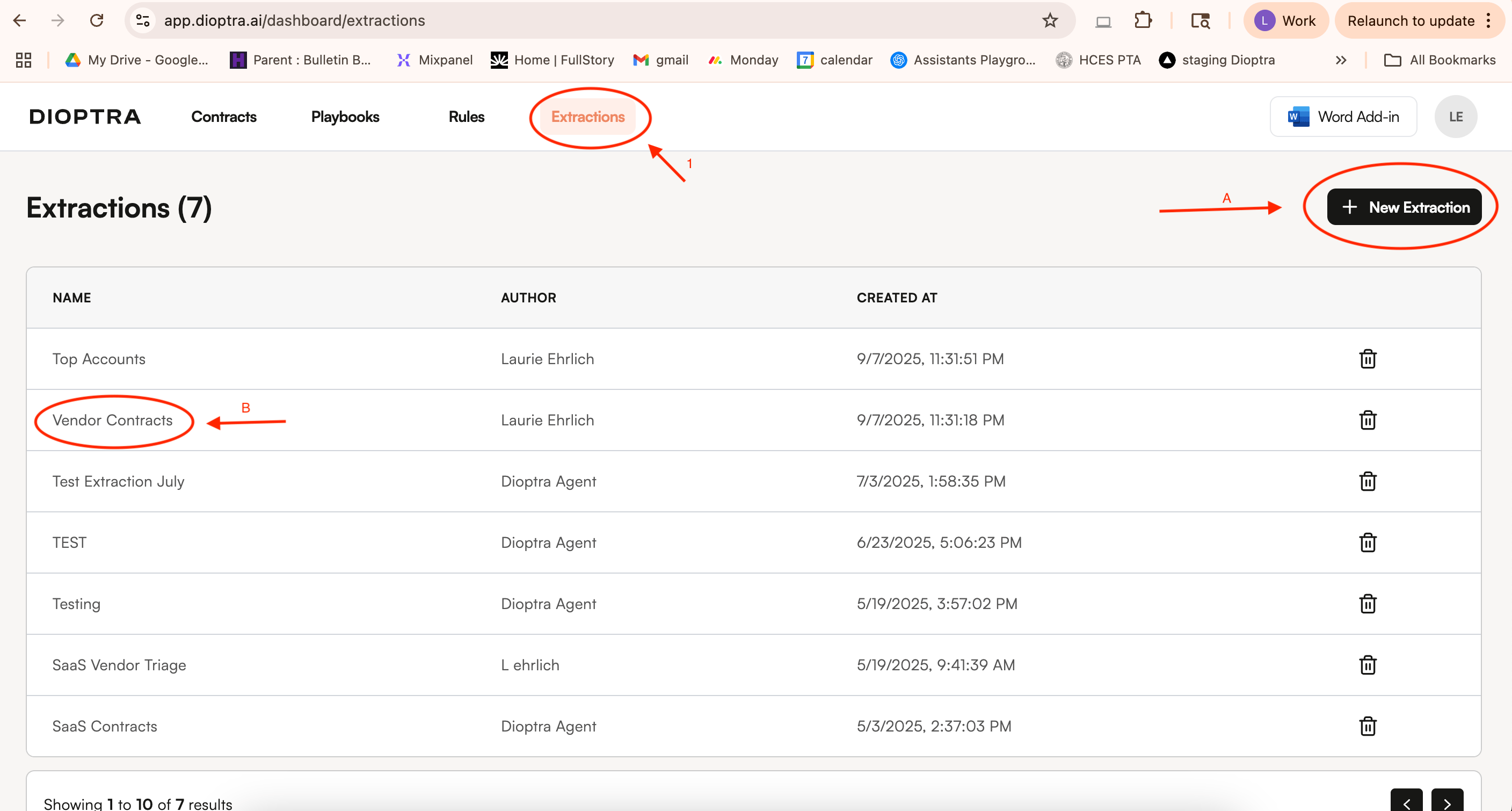
On the Web App, select the Extractions tab in the top menu bar. Create a new extraction set by clicking on New Extraction on the top right.
You can also add documents to an existing extraction table by selecting the existing extraction group from the column on the left.
 ### Step 2: Add your documents and your desired data points
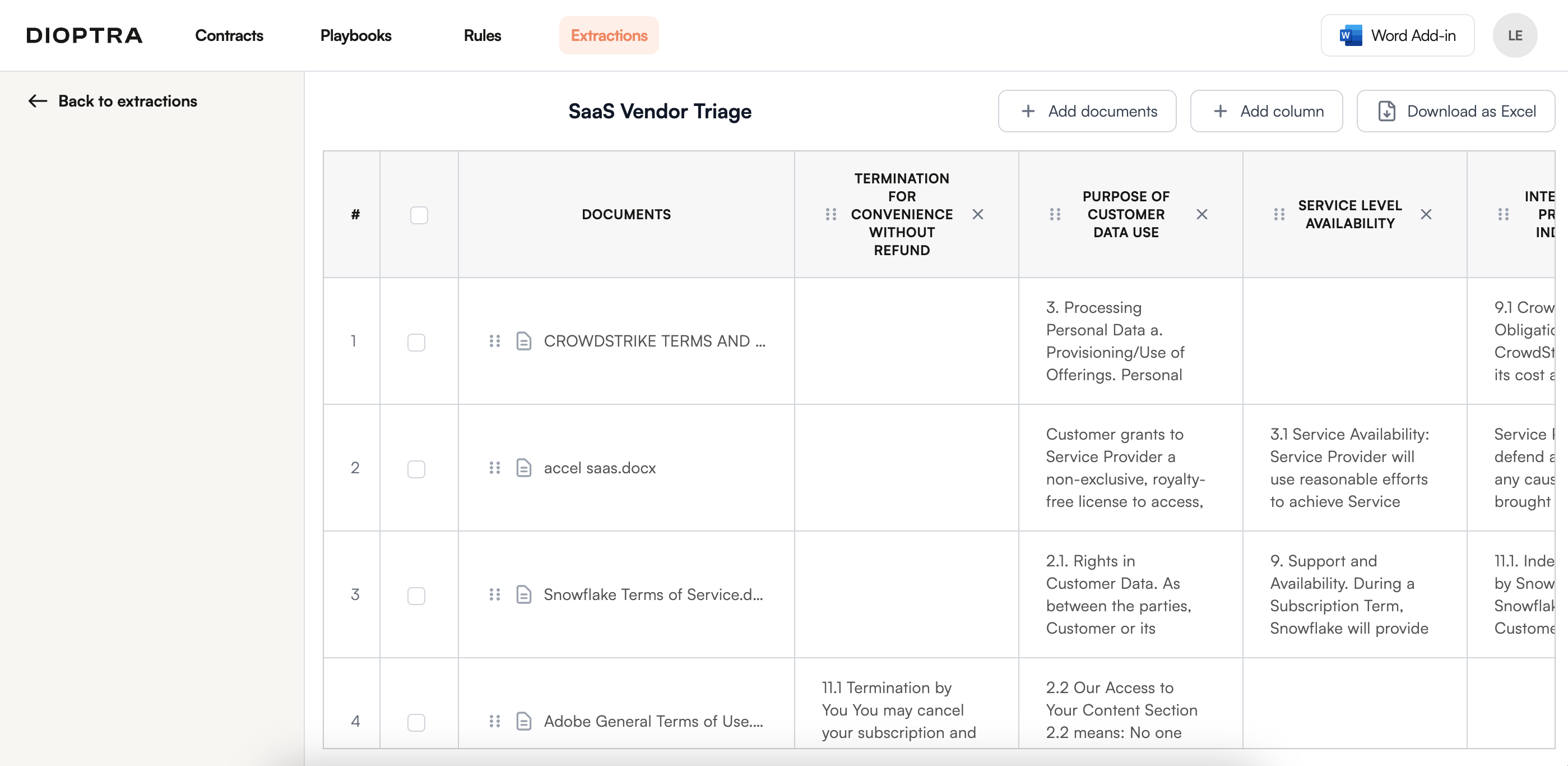
Add documents where you want to pull out terms and add columns to identify the terms you want to extract. You can ask for yes/no answers, actual extracted text, or summaries of issues.
### Step 2: Add your documents and your desired data points
Add documents where you want to pull out terms and add columns to identify the terms you want to extract. You can ask for yes/no answers, actual extracted text, or summaries of issues.
 Here are some prompting instructions that you might find useful:
* Extracting language: "extract the complete language pertaining to....."
* Returning yes/no responses: return the results as "Yes" or "No"
* Summary: describe....
Here are some specific frequently used prompts:
* **Counterparty Identification**: The party to the agreement that is not "your own company name"
* **Document Type**: describe the type of document (e.g. email. master agreement, purchase order, amendment, etc)
* **Short Summary**: one sentence summary of the document
* **Parent Agreement Identification**: For documents that are purchase orders, orders, quotes, amendments, or other forms of documents that are related to (but are not) top-level agreements, identify the name and date of the controlling/top-level agreement (e.g. the master agreement, the software license agreement, etc).
### Step 3: Review the data
Review the results in the Web App or download to excel to manipulate the data or share with relevant stakeholders. You can also set up automated workflows to send the data into systems across your organization.
Here are some prompting instructions that you might find useful:
* Extracting language: "extract the complete language pertaining to....."
* Returning yes/no responses: return the results as "Yes" or "No"
* Summary: describe....
Here are some specific frequently used prompts:
* **Counterparty Identification**: The party to the agreement that is not "your own company name"
* **Document Type**: describe the type of document (e.g. email. master agreement, purchase order, amendment, etc)
* **Short Summary**: one sentence summary of the document
* **Parent Agreement Identification**: For documents that are purchase orders, orders, quotes, amendments, or other forms of documents that are related to (but are not) top-level agreements, identify the name and date of the controlling/top-level agreement (e.g. the master agreement, the software license agreement, etc).
### Step 3: Review the data
Review the results in the Web App or download to excel to manipulate the data or share with relevant stakeholders. You can also set up automated workflows to send the data into systems across your organization.