> ## Documentation Index
> Fetch the complete documentation index at: https://documentation.dioptra.ai/llms.txt
> Use this file to discover all available pages before exploring further.
# Workspaces
> Persistent rooms for complex projects and repeatable workflows.
A workspace is a persistent room for one body of work. It holds the materials the agent reads, the conversations you have about them, the outputs those conversations produce, and the people you share them with. Playbooks live in workspaces, but a workspace is useful for any project that outlives a single conversation, such as an M\&A diligence review, a repapering exercise, or a template refresh.
Playbooks are built and maintained in a workspace. See [Playbooks](/agenticplaybooks) for the full build process.
## Creating a workspace
From the web app, go to Chat and click **New Workspace**.
Give it a short, unique name (for example, `SaaS Playbook` or `Acme diligence`) and a description. If several teams create workspaces, agree on a naming convention so they stay easy to find.
Attach the files the agent should work from. For a playbook, these are the files you would give a new joiner: standard forms, existing playbooks or checklists, and example redlines.
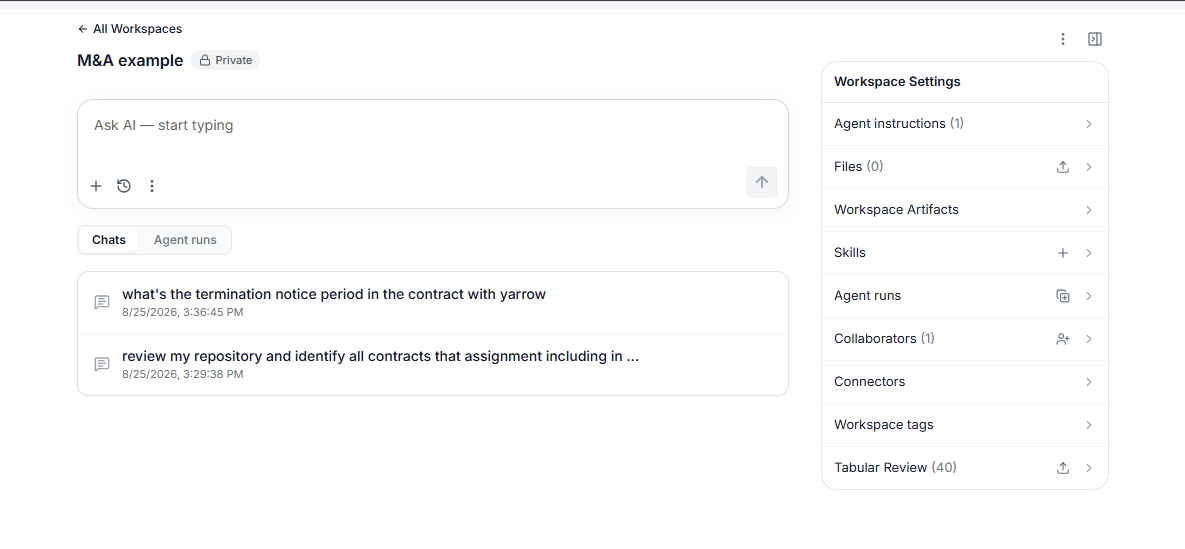 ## Workspace settings
The settings panel on the right of a workspace holds everything the workspace knows and everyone who can see it.
| Setting | What it holds |
| :---------------------- | :------------------------------------------------------------------------------------------------------------------------- |
| **Agent instructions** | Standing guidance the agent follows for every conversation in this workspace. |
| **Files** | The source materials the agent reads. |
| **Workspace Artifacts** | Outputs promoted so they persist across every conversation in the workspace. |
| **Skills** | Custom skills saved to this workspace. |
| **Agent runs** | The history of agent and playbook runs, tracked separately from chat. |
| **Collaborators** | Who can see the workspace, and who can edit it. |
| **Connectors** | The document sources feeding this workspace. |
| **Workspace tags** | Labels that make a workspace easy to find. The `playbook` tag is applied automatically whenever you use `create playbook`. |
| **Tabular Review** | Review the documents attached to the workspace together as a table. |
## Chats and agent runs
A workspace keeps two lists side by side:
* **Chats** - every conversation in the workspace, with its date and time. Click any conversation to reopen it and continue.
* **Agent runs** - playbook and agent runs, tracked separately so a long-running job does not get lost among your conversations.
## Sharing a workspace
A new workspace is **Private** until you share it.
Share with your entire organization or with named individuals, and choose the role for each person:
* **Editors** can modify the workspace materials and, for a playbook, the rules.
* **Viewers** can run the playbook and ask questions of it, but cannot change it.
## Artifacts in a workspace
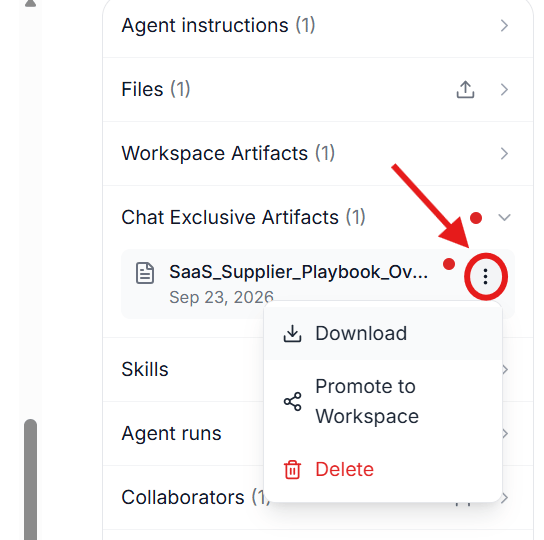
Documents and tables created in a workspace conversation are saved as conversation artifacts. Promote an artifact to a **workspace artifact** to make it available across every conversation in the workspace and to everyone you have shared it with. A completed playbook rule table is a workspace artifact.
Click the three-dot menu on any artifact and select **Promote to Workspace**.
## Workspace settings
The settings panel on the right of a workspace holds everything the workspace knows and everyone who can see it.
| Setting | What it holds |
| :---------------------- | :------------------------------------------------------------------------------------------------------------------------- |
| **Agent instructions** | Standing guidance the agent follows for every conversation in this workspace. |
| **Files** | The source materials the agent reads. |
| **Workspace Artifacts** | Outputs promoted so they persist across every conversation in the workspace. |
| **Skills** | Custom skills saved to this workspace. |
| **Agent runs** | The history of agent and playbook runs, tracked separately from chat. |
| **Collaborators** | Who can see the workspace, and who can edit it. |
| **Connectors** | The document sources feeding this workspace. |
| **Workspace tags** | Labels that make a workspace easy to find. The `playbook` tag is applied automatically whenever you use `create playbook`. |
| **Tabular Review** | Review the documents attached to the workspace together as a table. |
## Chats and agent runs
A workspace keeps two lists side by side:
* **Chats** - every conversation in the workspace, with its date and time. Click any conversation to reopen it and continue.
* **Agent runs** - playbook and agent runs, tracked separately so a long-running job does not get lost among your conversations.
## Sharing a workspace
A new workspace is **Private** until you share it.
Share with your entire organization or with named individuals, and choose the role for each person:
* **Editors** can modify the workspace materials and, for a playbook, the rules.
* **Viewers** can run the playbook and ask questions of it, but cannot change it.
## Artifacts in a workspace
Documents and tables created in a workspace conversation are saved as conversation artifacts. Promote an artifact to a **workspace artifact** to make it available across every conversation in the workspace and to everyone you have shared it with. A completed playbook rule table is a workspace artifact.
Click the three-dot menu on any artifact and select **Promote to Workspace**.
 If a playbook will not run, see [Troubleshooting](/agenticplaybooks#troubleshooting) for how to check and fix the workspace artifact.