
Table Formatting Wonky
Table Formatting Wonky
You asked for results in a table, but they are showing as a big block of text? Just ask Chat to “fix the table formatting”
Chat Not Giving You the Results You Want
Chat Not Giving You the Results You Want
Explain to the Chat what it is doing wrong and ask it for suggestions on how to improve your prompt to achieve the desired results
Incomplete Responses
Incomplete Responses
You got an answer, but it seems like it is missing sections or issues or something else. Remind the Chat to keep going or let it know that its response is incomplete. Here are some ways to phrase your prompts to avoid this happening in the future:
- When you have a long document, include in your prompt an instruction to use subagents to review each section. e.g. instead of “review this document for key risks” say “use subagents to review each section of this document for key risks”
- Use words like all, full, complete, detailed
When action buttons such as apply, regenerate, and save aren’t responding you may need to reload the Add-in. Click on the hamburger in the bottom right of the Chat and select Reload Vera Engage Add-in.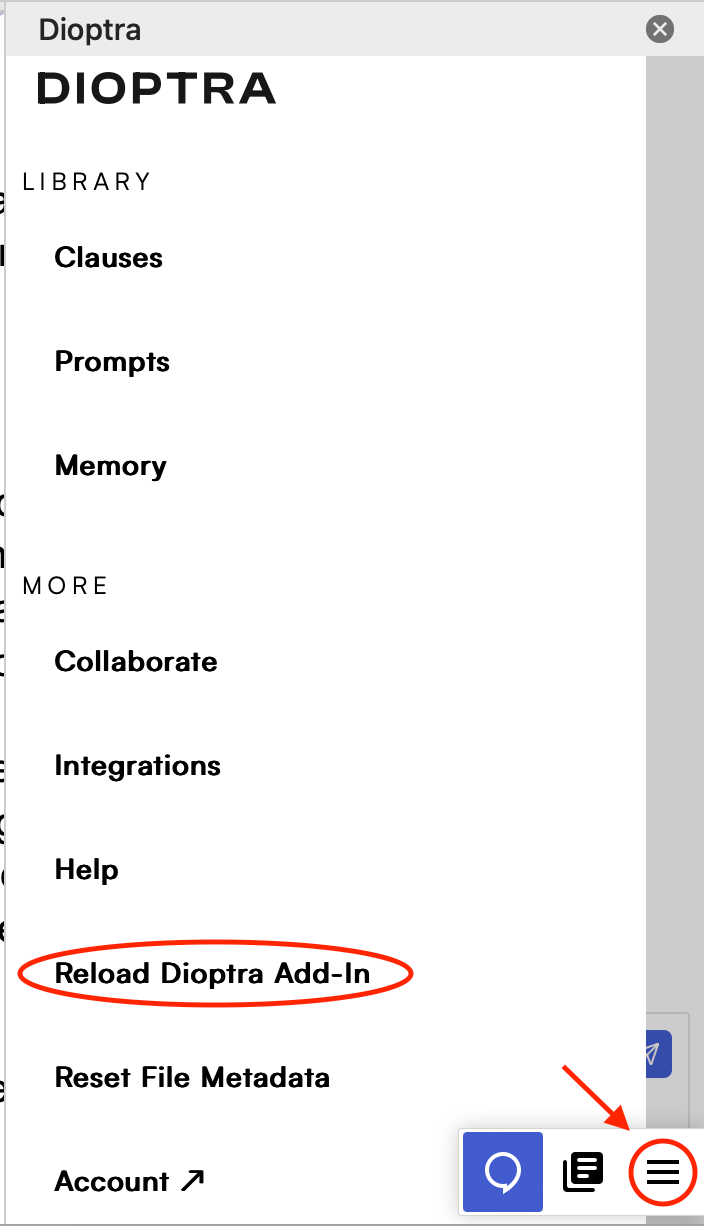
Emailed a contract with an unreadable attachment
Emailed a contract with an unreadable attachment
If you email a contract along with a file that cannot be read (such as a signature image or a damaged document), Vera Engage will still process your request. It will name each file it could not read and let you know whether the file type is not supported or whether an error occurred.
Can't Read/Process the File
Can't Read/Process the File
- Check whether the file is a .docx, if not resave it as a .docx
- Save the document to your local drive
- Reload the Add-in — see “Action Buttons … Aren’t Responding” above for how.